¶ Database Encryption
¶ What is Database Encryption?
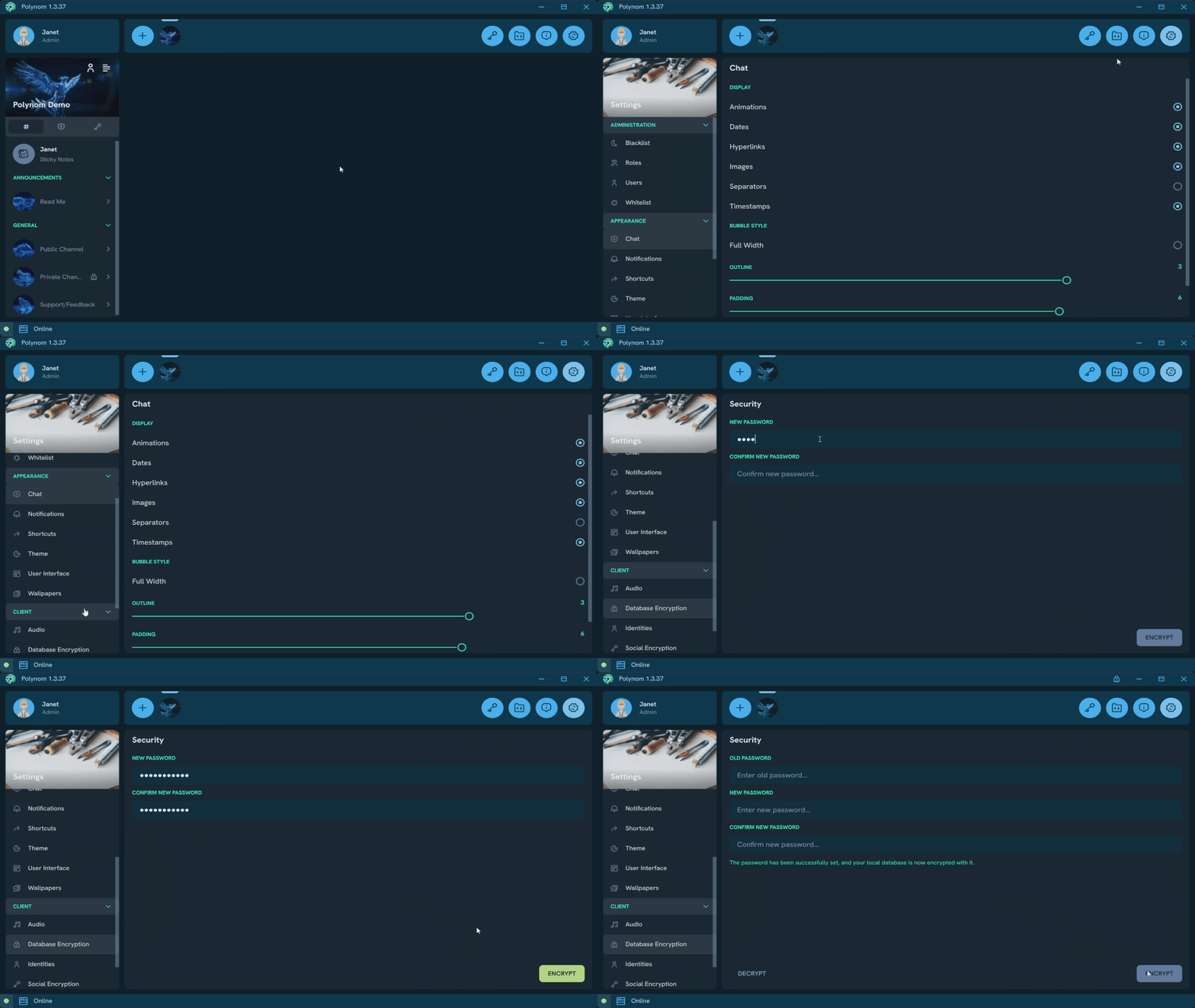
Database Encryption lets you set a password on your Polynom client, preventing unauthorized access on your device. Once set, the password is required to open Polynom.
To enable it, navigate to the Database Encryption page in Settings, enter a password, and press Encrypt.
To remove it, navigate to the Database Encryption page in Settings, enter your current password, and press Decrypt.
Note: Database Encryption is a per device feature. Unlike Identities, which can be imported across devices, a Database Encryption password applies only to the device it is set on. It must be configured separately on each device you use.
¶ Forgotten Password
If you forget your Database Encryption password, it cannot be recovered. To continue using Polynom on that device, you will need to either uninstall and reinstall the app, or manually delete the contents of your Polynom folder. In both cases, all Identities and custom settings stored on that device will be permanently lost.
Default Polynom folder locations:
- Windows: C:\Users{username}\AppData\Local\Polynom
- Linux: /home/{user}/.local/share/Polynom/
- macOS: ~/Library/Application Support/Polynom
Important: Before taking either of these steps, make sure you have your Identity Exported and backed up. Without an exported
.nomfile, your Identity cannot be recovered.
For other frequently asked questions about Polynom, see the FAQ.